Trace the recorded hours
Review the freelancer’s recorded hours against the project and task context available to your workspace.
Reporting
Turn recorded work into summaries that people can review and understand.
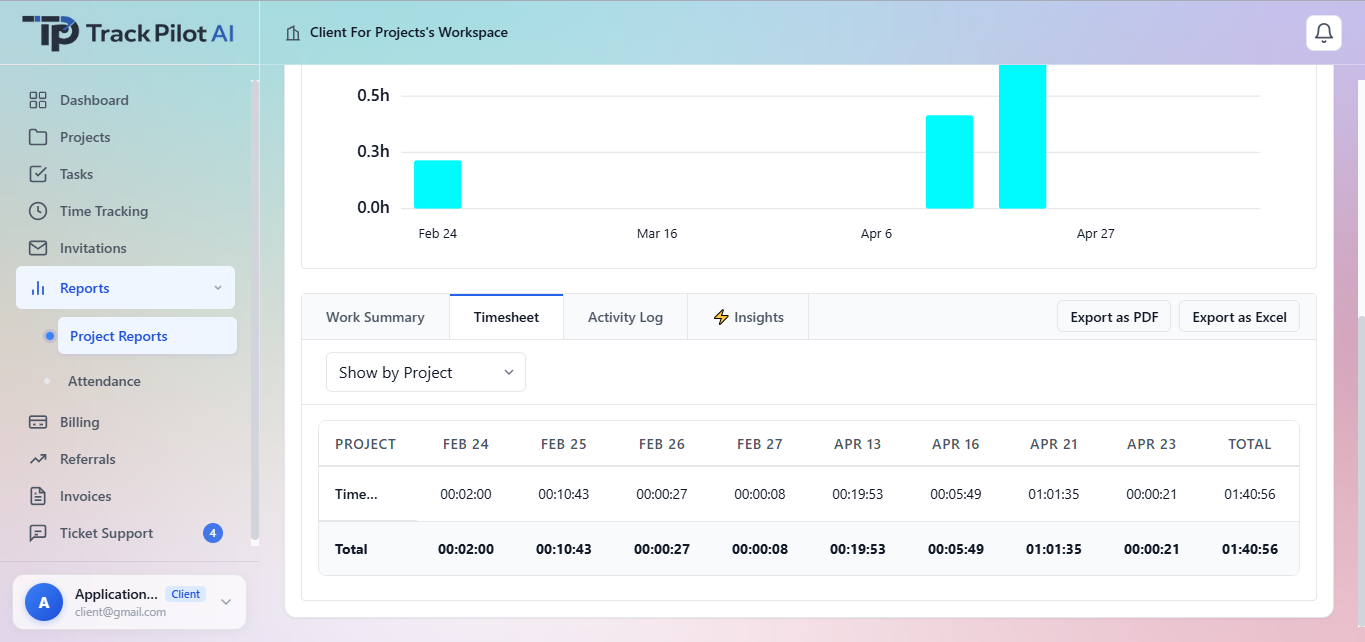
Review the freelancer’s recorded hours against the project and task context available to your workspace.
Choose the report that fits the question being discussed, such as project effort or a time-record review. Explain what its figures represent.
Before preparing a billing summary, review which hours belong in the output. Use the documented billing workflow and supported output formats.
Authorized clients and managers can review available freelancer reports and timesheets according to workspace permissions. Use project, task, tracked time, and available activity context together rather than treating one report or signal as a complete measure of performance.
Start with project and task structure, then carry reviewed records into approvals or supported billing workflows.
Who it supports
Reports and timesheets give authorized reviewers a shared view of freelancer time, project progress, and available activity context without separating the summary from its source record.
View available freelancer reports and timesheets to follow project progress and review recorded effort.
Compare tracked time, tasks, and available activity context when checking delivery or resolving questions.
Use the project and task record to understand how completed work and tracked time appear in reports.
Where it fits
A report can support planning, review, or a client update when authorized users can trace it back to the underlying project, task, and time records. Confirm available filters, exports, sharing, and plan behavior before promising a particular reporting format.
Work management
Give authorized clients and managers a clear way to review freelancer time, project progress, timesheets, and available activity context.
Start with the project, task, freelancer, and tracked time behind the report.
Use work summaries, timesheets, and available activity information to understand the recorded work and identify questions.
Use the available report output for a client update, planning decision, approval, or supported billing workflow.
The useful connection
A total is easier to discuss when clients and managers can trace it to the freelancer’s project, tasks, and tracked sessions. Reports keep the source visible for the next decision.
In practice
A client manager can open a project report, review a freelancer’s timesheet and available activity context, check an unusual entry with the related task, and share the reviewed summary with the client team.
Explore the related feature pages for the next steps in this workflow.
Review the features and current plans, or contact the team with a specific requirement.