Organize work into projects and tasks
Give the work a structure people can follow. Use consistent project and task names so time records and delivery discussions refer to the same work.
Work organization
Connect planned work with recorded effort so contributors and reviewers can discuss the same project or task.
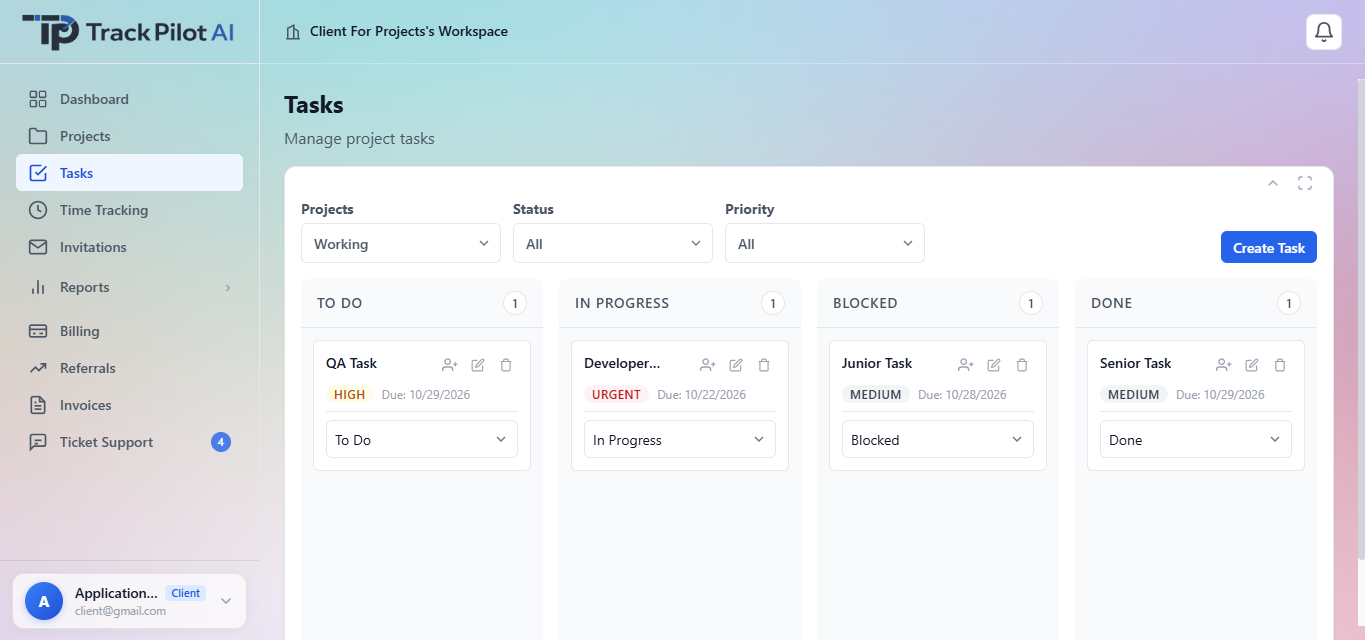
Give the work a structure people can follow. Use consistent project and task names so time records and delivery discussions refer to the same work.
Review time against the project or task being performed. Compare recorded effort with the work completed and discuss any missing context before approval.
Use project context and the available reports to discuss progress, blockers and next actions. Do not use recorded hours alone as a measure of task quality.
Keep project, task and approval context connected when preparing a report. Link to the time tracking, approvals and reports pages for the full workflow.
Authorized clients and managers can use project task context to coordinate freelancer work, check blockers, and see what is ready for review. Access and available task actions follow the workspace configuration and assigned permissions.
Connect task planning to time tracking, then use reports and approvals.
Who it supports
A shared task workspace helps authorized clients and managers create assignments, organize priorities, follow status changes, and connect freelancer effort to the project.
Create and organize the tasks, priorities, and delivery context for assigned freelancer work.
Assign work, follow statuses, and identify blocked or completed tasks during review.
Use the assigned task as the reference point for completing work and recording time.
Where it fits
A task structure is valuable when it reflects how the team actually delivers work. Keep it focused enough to use during time capture and review, then carry the context into reports and approvals.
Work management
Let authorized clients and managers create, assign, prioritize, and review freelancer tasks while keeping related tracked time connected to the project.
A client or manager creates a task in the project workspace and assigns it to the freelancer responsible for the work.
Use the task board to keep priorities visible and show whether work is To Do, In Progress, Blocked, or Done.
Compare task status and recorded time to discuss delivery, blockers, corrections, and the next step.
The useful connection
When task ownership and progress are scattered across messages, clients and managers have to reconstruct what should happen next. A shared task board gives the freelancer and reviewers the same project context.
In practice
A client creates a development task, assigns it to a freelancer, marks it urgent, and follows the task from To Do through In Progress to Done while reviewing the time recorded against the project.
Explore the related feature pages for the next steps in this workflow.
Review the features and current plans, or contact the team with a specific requirement.