Freelancers
Create project context, capture time, and review the record before sharing it.
Solution
Record work while project context is fresh, then review your hours before preparing a client-facing summary.
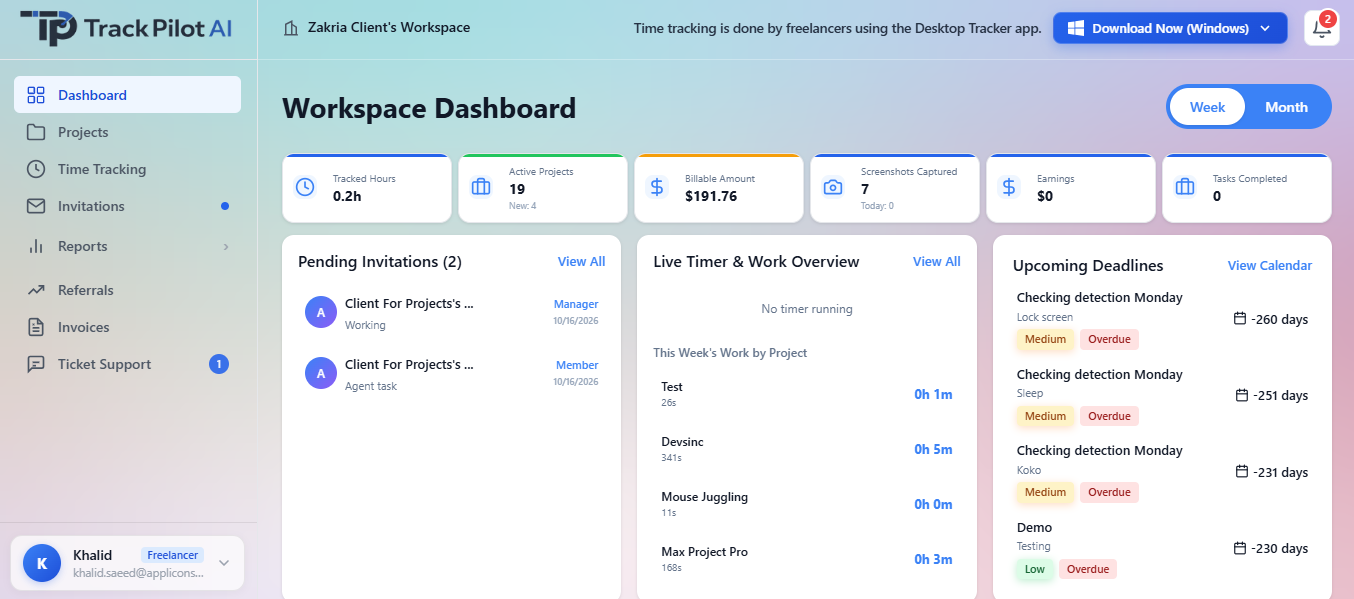
For independent work
Task structure you use most, track work through the supported workflow, and review the entry while its context is fresh. The goal is a clear explanation of effort, not a pile of disconnected activity.
A focused weekly loop
Create project context, track the session, review billable time, and share a clear report. Each step keeps the next client conversation closer to the work performed.
01
Create context
02
Track as you go
03
Review entries
04
Share the result
Keep client conversations simple
A useful freelance record keeps the project, task, time, and reviewed result connected. See time tracking, reports, and supported billing workflows.
Finish a focused session, review the task and time entry, and use the resulting report when answering a client question about effort.
Who it supports
Freelancers move between clients, projects, tasks, and invoice questions. A focused record keeps those pieces connected while the work is still fresh.
Create project context, capture time, and review the record before sharing it.
Answer questions about effort with a report grounded in the task performed.
Carry reviewed billable-time output into the separate invoicing process they already use.
Where it fits
A simple workflow can make the handoff easier: create context, record the session, review the entry, and share the resulting report. Invoice creation and payment handling remain separate responsibilities.
Freelancers workflow
Move between projects, time capture, client questions, and billing preparation without reconstructing a week from memory.
Record time while project context is fresh.
Keep project and task boundaries visible.
Use reviewed time and reports to explain billable effort.
Set up the client work and tasks.
Record time against the relevant task.
Check entries, corrections, and billable context.
Carry the report into a separate invoice workflow.
In practice
A freelancer can finish a focused session, review the task and time entry, and use a clear weekly report when answering a client question about effort.
Connect individual time records with project context, reports, and the supported billable-time workflow.
Review the features and current plans, or contact the team with a specific requirement.