Connect tools to the work being done
Review the applications and website context available in a work record alongside the task being performed. Use that context to understand a workflow or investigate a blocker.
Activity context
Review activity context alongside recorded time, tasks and outcomes to understand work patterns more clearly.
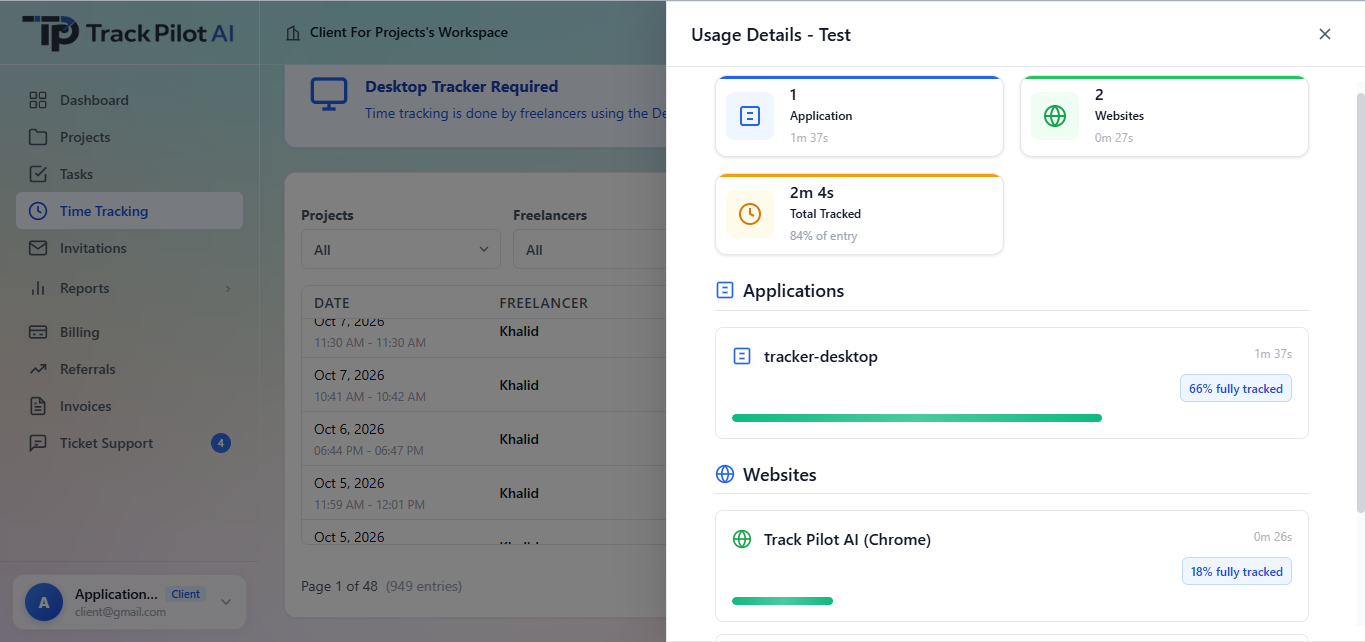
Review the applications and website context available in a work record alongside the task being performed. Use that context to understand a workflow or investigate a blocker.
A single activity record does not explain the whole workday. Review repeated patterns, project context and completed outcomes before making a decision.
Make the purpose, collection scope, and access rules clear before using activity monitoring. Link the workflow to your monitoring policy to ensure transparency and trust.
Who it supports
Application and website activity can help a team investigate a pattern, but it becomes more useful when reviewed beside the project, task, time record, and expected outcome.
Use activity context to open a focused conversation about a project or process.
See how tool usage is being interpreted within the work they were asked to complete.
Document keyboard and mouse activity, screenshots, webcam captures, app and website usage, monitoring limits, and access rules.
Where it fits
Activity context can help identify friction, clarify a work pattern, or compare a session with the expected workflow. It cannot explain value on its own, so the review should include the work record and the person closest to it.
Monitoring context
Review supported application and domain context alongside tracked time and project information without treating tool usage as a standalone performance score.
Use signals with care
Activity data is easy to overread. Keeping it beside the work description and outcome helps managers distinguish tool usage from value delivered.
In practice
A remote team can review tools used during a task, then discuss whether that activity matches the expected workflow or whether the task needs clarification.
Explore the related feature pages for the next steps in this workflow.
Review the features and current plans, or contact the team with a specific requirement.